
This article will show you the process managing your prospective volunteers using the Intake Manager.
Required access:
You will need the Volunteer Engagement Co-Chair access level.
How to get there:
- Enter the Administrative Area
- Navigate to Volunteer Management by clicking on the person icon
- Select Intake Manager
Steps to be taken:
- Click on the Intake Manager link
- Here, you will see all prospective volunteers that have verified their email addresses.

- Their Name, the Entry Point through which they entered your organization, their Status, the Chapter they will become a member of, administrative Notes, their Progress Status, the # Dayscolumn, which displays the number of days they have been in the Intake Manager, and a Progressbar showing how far along they are in their Path will be displayed, as well.
- On the right side of the page, you will see a column called Actions. There will be 2 links in this column:
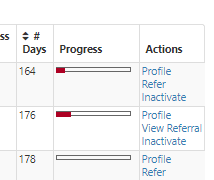
- Profile: Clicking this link will take you to their profile.
- Refer: Clicking this link will allow you to refer them to a position.
- Inactivate: Clicking this link will deactivate their volunteer profile
- If you click the Progress bar, you will be taken to a page displaying all of their steps and which they have completed/need to complete.
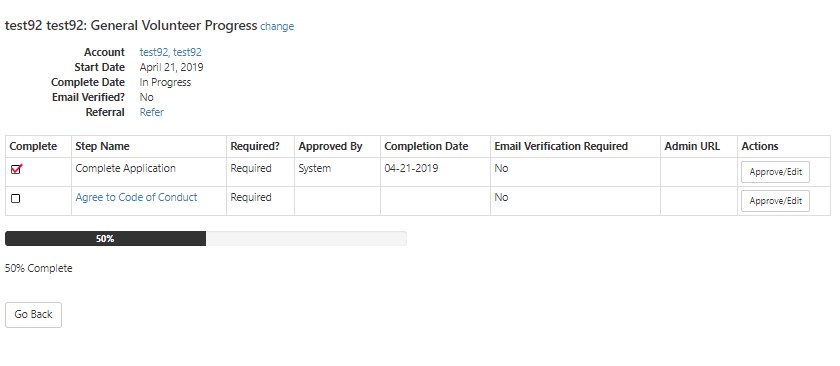
- If you click Approve/Edit in the Actions column, you can manually approve their steps by setting the Step Completed dropdown to Yes or even edit them to make sure they have to do that step again by setting it to No.

- If you click Approve/Edit in the Actions column, you can manually approve their steps by setting the Step Completed dropdown to Yes or even edit them to make sure they have to do that step again by setting it to No.
Comments
0 comments
Please sign in to leave a comment.